
Chicken vs Zombies takes a minute to learn. You set a bet, pick one of four difficulty levels and move a chicken past a row of zombies one step at a time. Every safe step makes the multiplier bigger, and you can cash out whenever you like. This page goes through each control and each decision in the order the game asks for them.
The screen and the controls
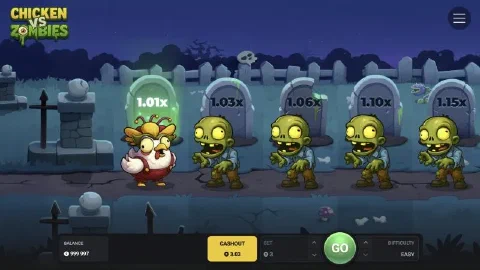
- Balance on the left shows your money.
- Cashout shows the amount you collect if you stop now. It lights up once the run is going.
- Bet sets the stake with the up and down arrows.
- The green button reads Play before the run and GO during it.
- Difficulty switches between Easy, Medium, Hard and Hardcore before the run.
- The menu in the top right corner holds sound, music, Space to spin and go, the provably fair settings, the game rules, your bet history and a short how-to-play panel.
Choosing your level
The level decides how many zombies stand on the lane and how quickly the multiplier grows. On Easy, the first zombie pays 1.01x and the fifth 1.15x. On Hardcore, the first zombie already pays 1.44x and the fifth 9.09x. Medium and Hard sit in between. If this is your first run, start on Easy or Medium. When you want faster growth per step, move up to Hard or Hardcore. Difficulty levels lists the zombie crews and the multipliers of every lane.
Stepping and cashing out
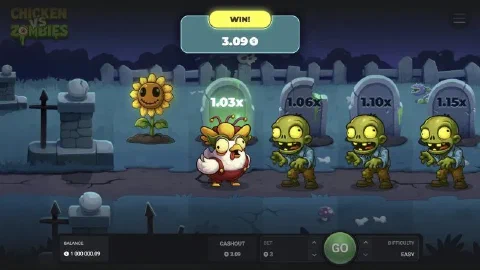
Every press of GO is one step. If the step is safe, the zombie you passed turns into a sunflower, the multiplier above the next tombstone becomes your target and the Cashout amount rises. If a zombie bites, the run ends.
The art of the game is choosing your exit. Some players set a target multiplier before the run, for example three steps on Medium, and cash out as soon as they reach it. Others decide step by step. Both work, as long as you choose before you press GO, not after.
The Chicken Boss
Clear a long enough streak of safe steps and the run upgrades to the Chicken Boss. One correct step beats the Boss and opens the top payout path, capped at $20,000 per round. You can still cash out at any time before you face it.
Playing on desktop and mobile
Chicken vs Zombies is built in HTML5, so the same controls work on a phone, a tablet and a computer. On a computer, turn on Space to spin and go in the menu and step with the Space key. On a phone, tap GO. Our partner’s app opens the game in one tap on Android and iPhone.
Next step: practise a few runs in the demo, then play for real with our partner.