Chicken vs Zombies Play now

Free demo · no deposit

Chicken vs Zombies Demo: Free Play on All Four Levels

Open the official demo right here: 1,000,000 in virtual credits, every difficulty level and the real cash-out button. When you are ready for real wins, our partner is one click away.

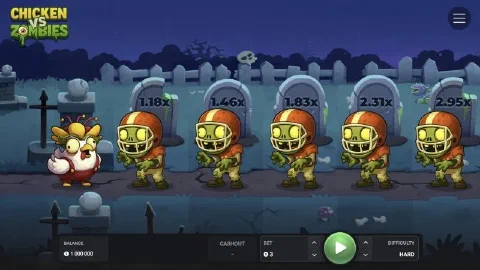
Chicken vs Zombies demo on Hard with football player zombies

Demo

Chicken vs Zombies demo on Easy with citizen zombies
Cross for real money

Multiplier on the fifth zombie

What one run of five safe steps reaches on each level of the demo.

  • Easy 1.15x
  • Medium 1.78x
  • Hard 2.95x
  • Hardcore 9.09x

A demo run in four steps

  1. 1

    Pick a level

    The demo opens on Hard. Use the arrows next to Difficulty to switch between Easy, Medium, Hard and Hardcore before the run.

  2. 2

    Set the bet

    The bet arrows change the stake. In the demo it comes from the virtual balance, so try small and large stakes alike.

  3. 3

    Press Play, then GO

    Play starts the run and puts the chicken on the first step. The same button turns into GO and moves the chicken past the next zombie.

  4. 4

    Cash out

    The yellow Cashout button shows what you would collect right now. Press it and the WIN panel shows the payout added to the balance.

Demo facts

Virtual balance

1,000,000

Levels

Easy, Medium, Hard, Hardcore

Game logic

The same as real play

Access

In the browser, no download

RTP

95.5%

Max win

$20,000 per round in real play

The Chicken vs Zombies demo is the official INOUT Games build with virtual money. It starts you with 1,000,000 in credits and gives you everything the real game has: the four difficulty levels, the bet panel, the step button and the cash-out button. Play as many runs as you like, then switch to real money with our partner when you know which level suits you.

What you see in the demo
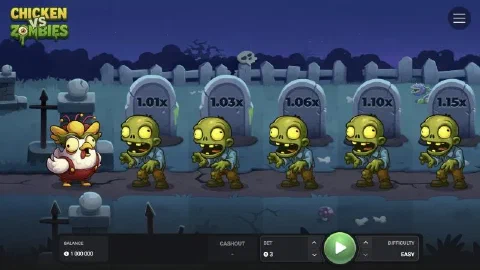
Chicken vs Zombies demo on Easy with multipliers 1.01x to 1.15x
Easy mode: Citizen Zombies and the first multipliers on the tombstones.

The chicken stands on the left, the zombies line up to the right, and the tombstone above each zombie shows the multiplier you reach by stepping past it. The bottom panel shows the balance, the Cashout amount, the bet and the difficulty. The menu in the top right corner holds sound and music, the Space to spin and go switch, the provably fair settings, the game rules and your bet history.

Try every level

Each level brings its own zombie crew and its own pace. On the first five steps the demo shows:

LevelZombiesStep 1Step 3Step 5
Easy301.01x1.06x1.15x
Medium251.08x1.37x1.78x
Hard221.18x1.83x2.95x
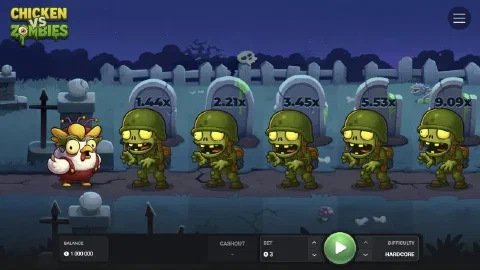
Hardcore181.44x3.45x9.09x
Chicken vs Zombies demo on Hardcore with soldier zombies and multipliers up to 9.09x
Hardcore: Soldier Zombies and a 9.09x multiplier by the fifth step.

Play a few runs on each level and watch how far you get before you press Cashout. That feel for the pace is what makes the real game more fun. Difficulty levels explains the four lanes and the Chicken Boss in detail.

Practise the cash-out
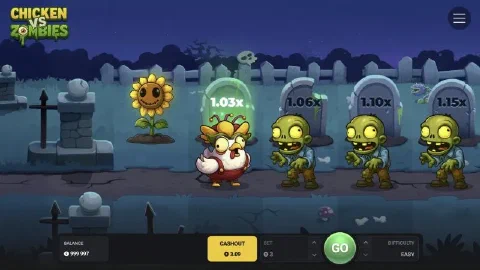
Chicken vs Zombies demo with the chicken on the second step and the Cashout button lit
Every zombie you pass turns into a sunflower, and Cashout shows your amount.

The key decision in Chicken vs Zombies is when to stop. After every safe step the Cashout button shows the amount you would collect. Press it and the round ends with a WIN panel and the payout added to your balance. Keep going and the multiplier rises, until the Chicken Boss waits at the end of the lane. The demo is the perfect place to find your own stopping points.

From the demo to real play

When you are ready, real play works the same way with real stakes. Our partner casino gives new players free spins and a bonus when they sign up, and Chicken vs Zombies opens in the browser or in the partner app. Start with the stake you used most in the demo and the level you enjoyed.

Next step: open Chicken vs Zombies with our partner and play your first real run.

Ready for real wins?

Take what you learned in the demo to real play. Our partner gives new players free spins and a bonus when they sign up. 18+. Play responsibly.

Frequently asked questions

Is the Chicken vs Zombies demo free?
Yes. It runs on virtual credits only, with a starting balance of 1,000,000, so you can play as many runs as you like.
Does the demo work like the real game?
It runs on the same game logic: the same four levels, the same multipliers and the same cash-out button. Real play adds real stakes and real payouts at a casino.
Can I win real money in the demo?
Demo wins stay on the virtual balance. Real-money wins come from real play, which you can open with our partner’s button.
Which level should I try first?
Easy, with 30 zombies and a gentle climb from 1.01x, is the best way to learn the rhythm. Move to harder levels once cashing out feels natural.
Does the demo work on my phone?
Yes. The game is HTML5, so the demo opens in the browser on Android, iPhone and desktop. For real play on the phone, see the app page.